
HTML to JSX Converter – Instantly Convert HTML Code to React JSX
An HTML to JSX converter is an essential tool for developers working with React, allowing them to quickly transform standard HTML markup into valid JSX syntax. Since JSX follows JavaScript rules and differs from plain HTML in several critical ways, manual conversion can be time-consuming and error-prone. An online HTML to JSX converter automates this process, ensuring clean, accurate, and React-ready output.
Whether you are migrating an existing HTML project to React or copying UI templates into a React component, an HTML to JSX converter helps you save time, reduce bugs, and follow best practices.
Live Bi-Directional HTML ↔ JSX Converter
What Is JSX and Why HTML Must Be Converted?
JSX (JavaScript XML) is a syntax extension used in React applications that allows developers to write UI components using a syntax similar to HTML. However, JSX is not HTML.
Key differences include:
- class → className
- for → htmlFor
- Inline styles as JavaScript objects
- Self-closing tags required
- CamelCase attribute naming
- JavaScript expressions inside {}
Because browsers do not understand JSX directly, converting HTML to JSX correctly is mandatory when working in React.
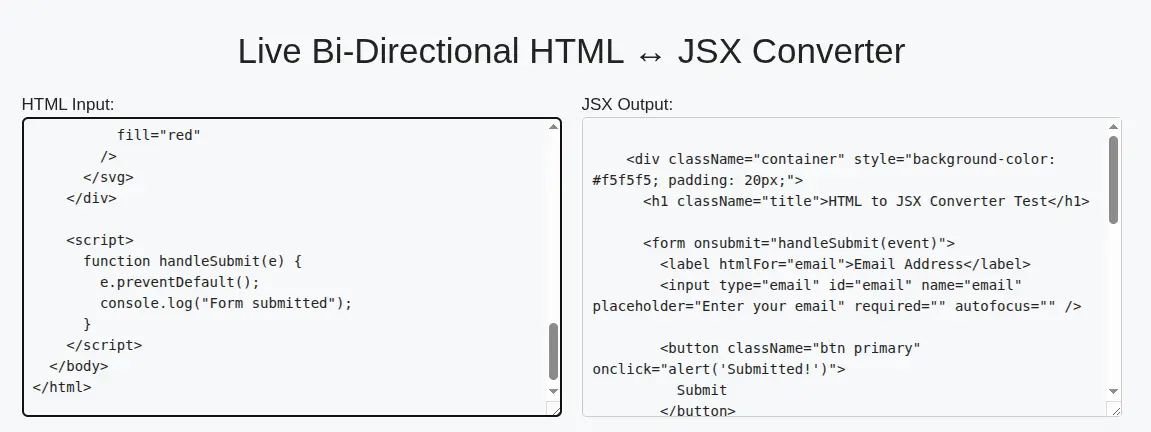
What Is an HTML to JSX Converter?
An HTML to JSX converter is a developer tool that:
- Parses HTML code
- Converts attributes into JSX-compatible syntax
- Fixes invalid React attributes
- Formats code for readability
- Outputs clean JSX ready for React components
This tool is especially useful for frontend developers, React beginners, and teams migrating from static HTML to component-based architectures.
How the HTML to JSX Converter Works
The conversion process follows these steps:
- Reads raw HTML markup
- Identifies invalid JSX attributes
- Converts HTML attributes into React equivalents
- Applies JavaScript-friendly syntax
- Outputs JSX that can be pasted directly into React
The result is React-compliant JSX code that compiles without errors.
Key Features of an Advanced HTML to JSX Converter
A high-quality HTML to JSX converter should include:
- ✅ Accurate attribute conversion (class → className)
- ✅ Inline style object transformation
- ✅ Self-closing tag correction
- ✅ Support for nested elements
- ✅ Clean and formatted JSX output
- ✅ Client-side conversion (no server calls)
- ✅ No data logging or storage
- ✅ Fast and lightweight processing
These features ensure compatibility with React, Next.js, Vite, and other modern frameworks.
Why Use an Online HTML to JSX Converter?
Using an online HTML to JSX converter provides several benefits:
- Saves development time
- Reduces syntax errors
- Improves code consistency
- Perfect for rapid prototyping
- Beginner-friendly
- No installation required
Instead of manually fixing errors after compilation, developers can rely on automated conversion.
HTML to JSX Converter for React Developers
React enforces strict syntax rules. Even small HTML mistakes can break builds. An HTML to JSX converter ensures your code follows React’s expectations, including:
- JSX-friendly attribute names
- Proper closing tags
- JavaScript-safe inline styles
- Clean component structure
This makes it easier to integrate converted JSX directly into functional or class components.
HTML to JSX vs Manual Conversion
Feature | HTML to JSX Converter | Manual Conversion |
Speed | Instant | Slow |
Accuracy | High | Error-prone |
Learning curve | None | Steep |
Best practices | Enforced | Often missed |
Scalability | Handles large HTML | Difficult |
For large HTML templates, automation is the only practical solution.
Common Use Cases
An HTML to JSX converter is commonly used for:
- Converting landing page HTML into React components
- Migrating WordPress themes to React
- Copying UI templates into React apps
- Learning JSX syntax
- Fixing JSX compilation errors
- Rapid UI prototyping
Is HTML to JSX Conversion Safe?
Yes, when performed client-side, the conversion is completely safe. A reliable HTML to JSX converter runs entirely in the browser, ensuring:
- No server requests
- No code storage
- No privacy risks
- No 403 or CORS issues
This makes it suitable for professional and enterprise use.
Best Practices After Converting HTML to JSX
After conversion, developers should:
- Wrap JSX inside a React component
- Replace static values with props if needed
- Refactor repeated UI into reusable components
- Validate output using ESLint or Prettier
- Test rendering in development mode
Conversion is the first step; optimization comes next.
Frequently Asked Questions (FAQ)
What does an HTML to JSX converter do?
An HTML to JSX converter transforms standard HTML markup into JSX syntax compatible with React.
Can I use JSX directly in the browser?
No, JSX must be compiled using tools like Babel before it can run in a browser.
Does JSX support all HTML tags?
Yes, but JSX enforces stricter syntax and naming rules.
Is an HTML to JSX converter free to use?
Most online converters are free and require no registration.
Can I convert large HTML files?
Yes, advanced converters support large and complex HTML structures.
Conclusion
An HTML to JSX converter is an indispensable tool for modern frontend development. It bridges the gap between static HTML and dynamic React applications by providing clean, error-free JSX output instantly. Whether you are a beginner learning React or a professional migrating production code, using a reliable HTML to JSX converter improves productivity, code quality, and development speed.
If your goal is to convert HTML to React JSX quickly, accurately, and safely, an online HTML to JSX converter is the smartest solution.
🔗 Ohio child support estimation tool – Helps parents estimate monthly child support in Ohio using income share guidelines and custody details ⚖️📊
Free WhatsApp DP Size Converter – Resize images online for WhatsApp DP easily and maintain proper aspect ratio. 🖼️
Free CGPA Score to Marks Calculator – Quickly convert cumulative grade points into percentage results with precision 📚✨