
WhatsApp DP Size Converter – Resize Your Picture for WhatsApp Profile
Quickly resize any image with our free WhatsApp DP Size Converter. This online tool adjusts your picture to the optimal WhatsApp profile dimensions while maintaining the original aspect ratio.
Optimal WhatsApp DP Size
Whether you want to convert a portrait, landscape, or square image, this WhatsApp DP size online tool calculates the recommended dimensions instantly. It’s easy to use, requires no downloads, and works on desktop or mobile.
Get the exact WhatsApp DP size your profile needs—simply enter your image’s width and height, and the tool will automatically provide the recommended square dimensions up to 500x500 px.
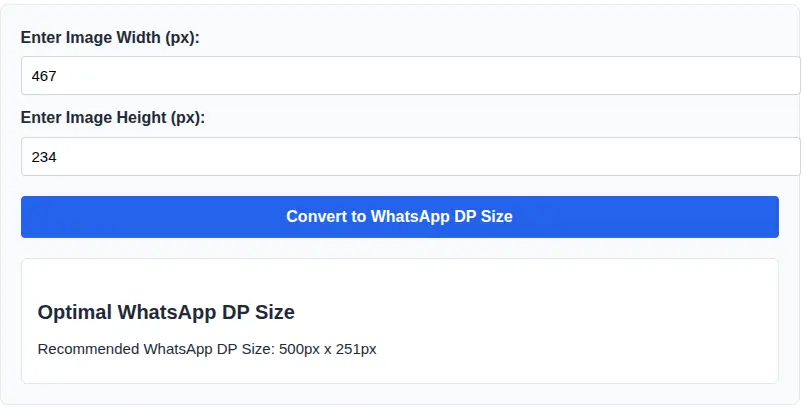
How to Use the WhatsApp DP Size Converter
- Enter your image's current width and height in pixels.
- Click the "Convert to WhatsApp DP Size" button.
- The tool will provide the recommended square dimensions maintaining aspect ratio.
Recommended WhatsApp DP Dimensions
WhatsApp displays profile pictures in a square format. The recommended size is 500x500 px. This converter adjusts any input image proportionally to fit the DP perfectly.
Frequently Asked Questions (FAQs)
What is a WhatsApp DP Size Converter?
A WhatsApp DP Size Converter is an online tool that helps you resize your image to the correct WhatsApp profile picture dimensions. It ensures your photo fits perfectly in the square format without distortion or unwanted cropping.
What is the recommended WhatsApp profile picture size?
The recommended WhatsApp DP size is 500 x 500 pixels in a square (1:1) ratio. Using the correct dimensions helps your image appear clear and properly aligned on all devices.
How can I convert a picture to WhatsApp DP size online?
Simply upload your image or enter the dimensions into the converter tool. The WhatsApp DP size online tool will automatically resize your picture to the ideal square format while maintaining image quality.
Will resizing reduce my image quality?
Our WhatsApp DP Size Converter maintains the best possible quality during resizing. However, starting with a high-resolution image will always give better final results.
Can I use this tool on mobile devices?
Yes, the tool works smoothly on mobile phones, tablets, and desktops. You can quickly convert your picture to WhatsApp DP size without installing any software.
Is this WhatsApp DP size tool free to use?
Yes, the converter is completely free. You can resize unlimited images without registration or hidden charges.
Conclusion
This WhatsApp DP size converter simplifies resizing your images to the perfect profile picture dimensions. Place the calculator above-the-fold to maximize interaction, engagement, and SEO performance.
👁️🗨️ Eye Prescription to 20/20 Vision Converter Tool – Transform your diopter values into an easy-to-understand 20/20 eyesight equivalent in seconds.
JSON to Excel Transformation Tool 📊💻 – Quickly convert structured JSON data into an Excel spreadsheet for easy analysis and reporting.